
Somewhere in your business, someone is playing human glue between two programs that refuse to talk to each other. Click, copy, alt-tab, paste, repeat. It’s usually the same person, the same desktop apps, and the same quiet sigh every single week.
One of my clients runs a 14-person industrial parts distributor. Their ops manager spends every Friday afternoon re-keying order confirmations from a supplier’s ancient ordering client into an inventory spreadsheet. We once asked an RPA vendor to quote automating that single task. The number came back higher than her monthly salary, so the Friday ritual survived. I thought of her the second I read Vercel’s announcement. And if the whole idea of software agents doing real work is new to you, our piece on AI agents joining the workforce is a decent primer.
What shipped
On October 31, 2026, Vercel Labs released agent-desktop, an open-source command-line tool written in Rust and licensed under Apache-2.0. It gives any AI agent computer use, meaning the ability to operate real software on macOS, Windows and Linux. The interesting part is the how. Rather than taking screenshots and guessing at pixel coordinates, agent-desktop reads the operating system’s accessibility tree and acts on stable references to interface elements. MarkTechPost covered the announcement.
Why SMBs should care
Operations is exactly where small businesses bleed hours into desktop-only software. Supplier portals, shipping clients, that ERP front-end from 2011. None of it has an API, so the work lands on a human. Pixel-watching automation tools have tried to fix this before, and in my experience they break the moment a window moves or an update shifts a button ten pixels to the left.
Reading the accessibility tree instead is a fundamentally sturdier idea, because the agent references interface elements the same way screen readers do. Whether it holds up in daily practice, I can’t say yet. I haven’t run agent-desktop hands-on, so treat this as a first look, not a verdict. But a free tool that lets an agent operate software you already own, across all three major operating systems, is worth an afternoon of anyone’s time. For my parts-distributor client, that Friday re-keying is roughly 150 error-prone hours a year, and it’s exactly the shape of problem this aims at.
How to take advantage
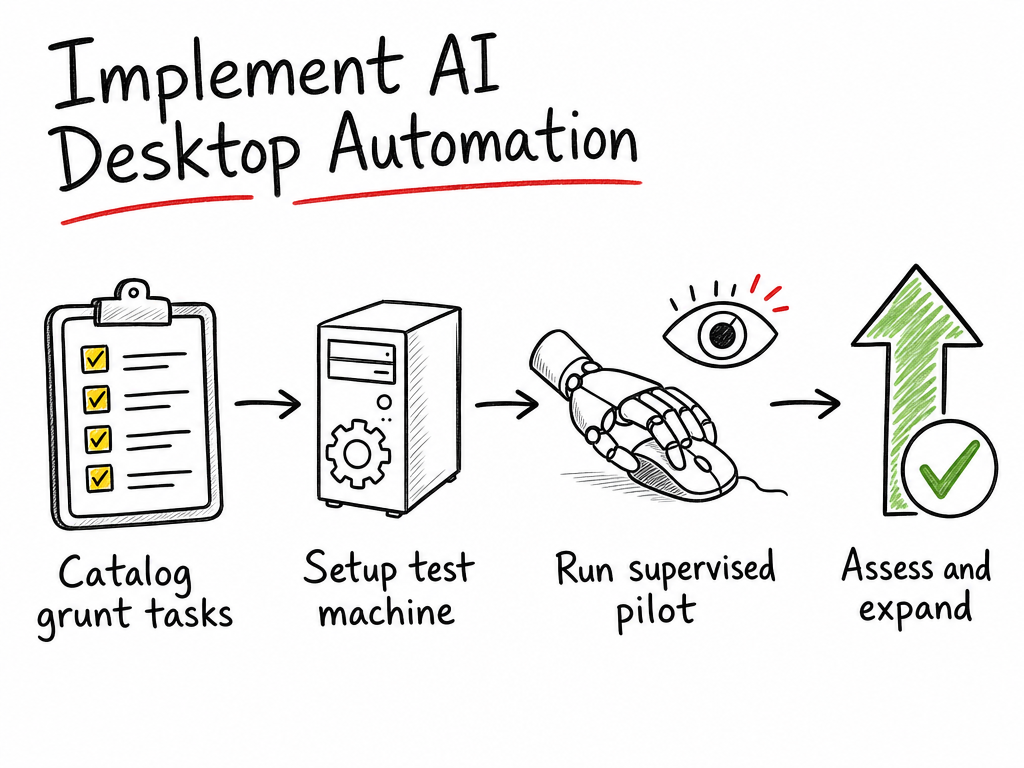
Three moves, all doable inside one week:
- List your desktop grunt work. Sit down with whoever does the clicking and write out every recurring click-and-type task that lives in a desktop app, with rough weekly minutes for each. The result: a shortlist of two or three candidates, and a much clearer picture of where the hours actually go.
- Set it up on a spare machine. agent-desktop is a CLI, so have someone reasonably technical install it and connect it to the AI agent you already use. The announcement doesn’t include step-by-step setup instructions for every platform, so follow the project’s official documentation rather than a random tutorial. The result: a safe test environment where the agent can drive one app without touching anything production-critical.
- Pilot one task, supervised. Pick the smallest task from your list, let the agent do it while a human watches, and compare the output against the manual version for a week. The result: actual evidence that it works with your specific software, not just a demo feeling.
Cost and effort
The software itself costs €0. Apache-2.0 means the license is free, full stop. What isn’t free is the AI model doing the thinking: agent-desktop gives an agent hands, but you supply the brain, and Vercel didn’t announce pricing or token consumption for that side. So I can’t give you a monthly figure, and I won’t invent one. If you want a framework for thinking about AI spend in general, our guide on what an SMB should actually budget for AI automation in 2026 helps.
On effort: a technical person can probably get a first test running in an afternoon. I’m guessing there, since I haven’t done the install myself. A supervised pilot on one task is roughly a week of low-intensity checking. If you bring in outside help for the setup, plan for one to two days of someone’s time.
One honest pitfall
Accessibility trees are the whole foundation here, and they’re also the soft spot. An app has to expose its interface to the operating system’s accessibility layer before the agent can see anything. Plenty of software does this well. But some of the oldest, weirdest desktop tools, precisely the ones you’d most want to automate, expose next to nothing. The agent can’t click what it can’t see.
My rough check before you get your hopes up: point your operating system’s built-in screen reader at the app in question. If the screen reader stumbles through it, the agent probably will too. And whenever an agent can act on a real machine, you want guardrails around what it’s allowed to touch, which is why I keep pointing people to our notes on workflow reliability. Also worth remembering: this is a days-old Labs release, so expect rough edges and don’t rebuild your ops around it next week.
If you want a second pair of eyes on whether agent-desktop fits your setup, grab a slot with us at startmit.com/consultation and we’ll poke at your clicking problem together.
Talk soon,
Damian