Apple quietly killed the Siri AI beta waitlist in iOS 27, and I did an actual double take when the ZDNet story landed. No queue. No invite email. If your team already carries iPhones, you can try the upgraded assistant today, and it won’t add a cent to your software bill. The full rollout timeline is still unclear, which is very on brand for Apple, but for small businesses this is a rare thing: a major AI upgrade you can test on hardware you already own. That’s more or less the philosophy behind our no-hype playbook for AI automation in small businesses. Test cheap, verify hard, commit late.
I’ve had about ten days with the Siri AI beta on my own phone, so treat this as a field report from one guy and his iPhone, not a final verdict. Fair warning: some of it genuinely impressed me, and some of it left me muttering at a screen.
What actually changed: the beta is now open
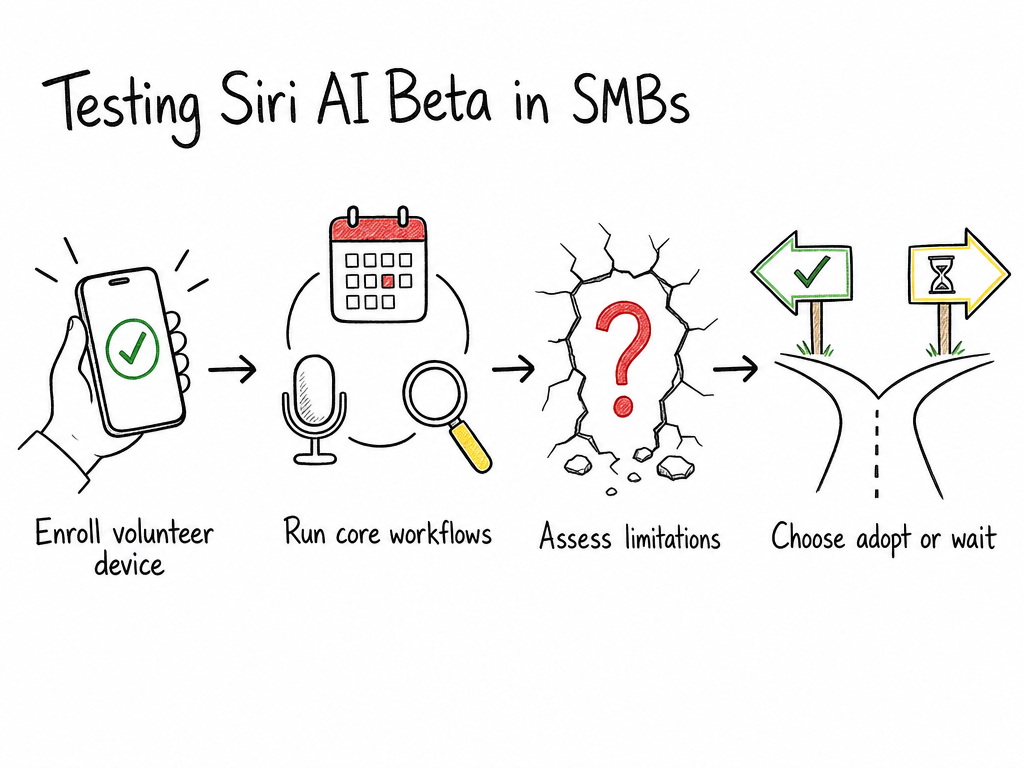
The short version: the queue is dead. Until now you had to request access and wait for Apple to let you in, and nobody knew how long that wait would run. Now anyone can enroll and try the new AI features on a device running the iOS 27 beta. No extra software cost, no new subscription, nothing to buy. If you’re already paying for the hardware, this rides along for free, which pretty much no AI tool can claim right now.
Who should care? Owner-operators, field crews, sales people who live in their cars, and small ops teams that never bought a scheduling tool because “Siri is free anyway.” That last group is the interesting one, because there might actually be something behind that excuse now.
Two questions I always ask about a tool: what does it cost per month, and what task does it remove? First answer is zero. Second answer depends on the workflow, so let’s get into the three I’d test first.
Three SMB workflows worth testing
A note on method before the list. One device, my daily driver, no client data on the line. Ten days, maybe three hours of actual poking spread across early mornings. Small sample, but real impressions.
1. Scheduling
My embarrassing baseline first. Last year our nine-person team paid Calendly about $10 a seat, roughly $90 a month, to end the “does Tuesday work?” email chains. It worked for a while, then clients quietly stopped clicking the links, and we drifted back to typing dates at each other like it was 2011.
So scheduling was the first thing I handed to the beta. I asked it to move a client call from Thursday to the following Tuesday and flag the clash with my weekly supply review.
It did both, in one pass. I checked the calendar three times anyway, because trusting an assistant with your diary takes a minute.
Ten days in, my read: strong for solo and small-team calendars that live in Apple Calendar, a bit bumpier if your calendar sits in Google Workspace and syncs across. Mine syncs and it mostly worked, but I wouldn’t promise the same for every setup.
2. Dictation
Dictation is my most-used phone feature by a mile. Two years ago I ran every voice memo through Otter for a month, about $9 a month, and the transcripts were genuinely good. Turns out transcription was never my problem. Finding the one sentence that mattered, out of forty clips, was the problem.
This time I dictated 25 short notes during a warehouse walk. Supplier stuff, pallet labels, a leaking roof vent, the usual. Later, at my desk, I asked in plain language what I’d said about the pallet labels. It pulled the right note.
That worked maybe eight times out of ten, which, with love for my own filing system, is a better hit rate than me. If your day runs on voice memos, this alone justifies an hour of testing.
3. On-device search
In March I lost 40 minutes hunting for a torque spec PDF a supplier had emailed me. I knew it existed. I knew roughly when. Couldn’t find it, asked them to resend it, felt like a clown. You’ve had this moment. Everyone’s had this moment.
On-device search is the feature I’d test if you only test one, because the payoff is exactly that scenario: describe the file in plain words instead of guessing which app it’s hiding in. My results inside Apple’s own apps, Mail, Notes, Files, were solid. Outside that garden it got patchy, which brings me to the problems.
Two limitations Apple still hasn’t solved
First, the garden wall. The upgraded Siri is strongest inside Apple’s own apps and noticeably weaker everywhere else, and that was true of the old Siri too. My Slack, my Asana boards, my Google Docs, barely got touched. Maybe deeper third-party support arrives with the full release. Maybe it doesn’t. Apple hasn’t said, and I’m not going to guess for them.
Second, consistency plus the missing date. The same phrasing produced different results on different days, once a clean reschedule, once a web search for the word “reschedule.” And since Apple hasn’t committed to any rollout timeline, whatever habits you build now could shift under you mid-quarter. Under our own workflow reliability rules, anything without a release date is a guest, not a resident. The beta deserves the same treatment.
And an honest admission: some of what frustrated me might be my own setup. The shared team calendar test failed outright, and I’ve re-checked my settings twice and still can’t tell you why. It might be a beta limitation, it might be me. That bugs me more than I’d like to admit.
How to enroll without disrupting your team’s devices
Rule one: one phone, not the fleet. Pick a volunteer device, ideally yours, back it up first, and keep anything client-facing off it for a couple of weeks. The features live in the iOS 27 beta, so the device needs to be on that train, and you should check Apple’s current compatibility list before promising your team anything.
I broke this rule within an hour of the waitlist dropping, because I put my daily driver on the beta immediately. In my defense, breaking things first is pretty much my job. But if your one office phone belongs to an office manager with zero patience for quirks, that is not the volunteer device.
The instinct here is the same one behind why we keep unfinished software away from production workflows: a beta that eats your morning is a story, a beta that eats a client deadline is a problem. Enroll, test quietly, report back, and don’t promise anyone anything based on beta behavior.
On the enrollment steps themselves, follow Apple’s own instructions rather than a blog’s screenshots, mine included. Those menus move between builds, and I’d rather not have you tapping through stale directions on my account.
When to just wait for the final release
Waiting is a legitimate strategy, and for some of you it’s the right one. If your operations live in third-party apps anyway, the garden wall means the beta won’t change much for you yet. If you handle regulated data, health, legal, finance, a beta assistant anywhere near that is a conversation you don’t want to have with a compliance officer. And if you don’t have a spare hour to babysit quirks, skip it. The timeline is unclear, and retraining your team’s habits twice costs more than waiting.
The upside of testing now is that the findings carry over. Even if the final release changes the details, you’ll know whether voice-driven scheduling actually fits your crew, and that knowledge doesn’t expire. If you want the broader picture of where this kind of assistant fits into a small operation, the AI automation playbook we keep for SMBs covers the boring, proven layer you want in place before betting on anything shiny, Apple’s included.
My plan is to keep testing and write the real verdict once Apple commits to a date. If you enroll this week, I’d genuinely like to hear what you find. Especially the shared calendar thing. If it works for you, tell me what I missed.
Talk soon,
Damian